100 Verses Every Dad Needs To Know
ISBN 978-1-60587-112-7
As you would expect, this is a book containing 100 passages of Scripture laid out in a daily devotional style. The premise, of course, is 100 verses that would be geared to a father.
Each devotion starts with the Scripture, then provides a brief discussion, then ends with quotes from other people about the topic of the particular Scripture.
Certainly, there were some passages that were directly related to fatherhood. Most could be applied to most everybody.
The quotes were also not exact quotes from the people, they were edited or even used from secondary sources, but even so they seemed to represent the original author well.
Overall, this isn't a bad book. Most of the readings are interesting and all of the Scripture is important for everyone to know. However, if you are looking for something that is geared to fathers then this isn't it.
Still reading here at Doe Valley.
February 19, 2016


January 22, 2016
Remove OneDrive from Win 10 & Office 2013
No doubt everyone who has upgraded to Windows 10 is rather annoyed at how ingrained Microsoft's OneDrive is to the OS, especially if you don't use it. There isn't a nice quick and easy way to uninstall it, but if you perform the following commands you will finally be rid of it!
Run the commands in the order below from an Administrator Command Prompt.
Uninstall OneDrive
Terminate any process of OneDrive by running the following command:
taskkill /f /im OneDrive.exe
Uninstall OneDrive app by running one of the following command:
In 32-bit Windows 10 (x86):
%SystemRoot%\System32\OneDriveSetup.exe /uninstall
In 64-bit Windows 10 (x64):
%SystemRoot%\SysWOW64\OneDriveSetup.exe /uninstall
Once you run the above command, OneDrive desktop app is uninstalled completely and cleanly. Most of the time, no progress bar nor confirmation dialog is shown. However, when you search for OneDrive, the app no longer found.
Cleaning and Removing OneDrive Remnants
Since OneDrive is a cloud storage service containing user data, there are folders and files from OneDrive app that are still available on the system as uninstallation does not remove user data.
Run the commands below to clean up those remnants by deleting OneDrive related folders and their contents:
Important: Make sure that the following folders no longer contain any needed user data before proceeding with the following commands.
rd "%UserProfile%\OneDrive" /Q /S
rd "%LocalAppData%\Microsoft\OneDrive" /Q /S
rd "%ProgramData%\Microsoft OneDrive" /Q /S
rd "C:\OneDriveTemp" /Q /S
Remove OneDrive in File Explorer Folder Tree Registry Key
OneDrive has registry keys which add itself to the Navigation Pane of File Explorer in Windows 10. After uninstalling OneDrive, these registry keys are orphaned, and can be removed.
REG Delete "HKEY_CLASSES_ROOT\CLSID\{018D5C66-4533-4307-9B53-224DE2ED1FE6}" /f
REG Delete "HKEY_CLASSES_ROOT\Wow6432Node\CLSID\{018D5C66-4533-4307-9B53-224DE2ED1FE6}" /f
Remove OneDrive from Office 2013
OneDrive has its own icon inside the file menu for Office 2013, follow these steps to remove that icon.
Open Word and click on the file menu.
Choose options at the bottom left side of the screen.
Click on the Save menu option
Uncheck the option "Show additional places for saving..."
Check the option "Save to Computer by default"
DONE!
Run the commands in the order below from an Administrator Command Prompt.
Uninstall OneDrive
Terminate any process of OneDrive by running the following command:
taskkill /f /im OneDrive.exe
Uninstall OneDrive app by running one of the following command:
In 32-bit Windows 10 (x86):
%SystemRoot%\System32\OneDriveSetup.exe /uninstall
In 64-bit Windows 10 (x64):
%SystemRoot%\SysWOW64\OneDriveSetup.exe /uninstall
Once you run the above command, OneDrive desktop app is uninstalled completely and cleanly. Most of the time, no progress bar nor confirmation dialog is shown. However, when you search for OneDrive, the app no longer found.
Cleaning and Removing OneDrive Remnants
Since OneDrive is a cloud storage service containing user data, there are folders and files from OneDrive app that are still available on the system as uninstallation does not remove user data.
Run the commands below to clean up those remnants by deleting OneDrive related folders and their contents:
Important: Make sure that the following folders no longer contain any needed user data before proceeding with the following commands.
rd "%UserProfile%\OneDrive" /Q /S
rd "%LocalAppData%\Microsoft\OneDrive" /Q /S
rd "%ProgramData%\Microsoft OneDrive" /Q /S
rd "C:\OneDriveTemp" /Q /S
Remove OneDrive in File Explorer Folder Tree Registry Key
OneDrive has registry keys which add itself to the Navigation Pane of File Explorer in Windows 10. After uninstalling OneDrive, these registry keys are orphaned, and can be removed.
REG Delete "HKEY_CLASSES_ROOT\CLSID\{018D5C66-4533-4307-9B53-224DE2ED1FE6}" /f
REG Delete "HKEY_CLASSES_ROOT\Wow6432Node\CLSID\{018D5C66-4533-4307-9B53-224DE2ED1FE6}" /f
Remove OneDrive from Office 2013
OneDrive has its own icon inside the file menu for Office 2013, follow these steps to remove that icon.
Open Word and click on the file menu.
Choose options at the bottom left side of the screen.
Click on the Save menu option
Uncheck the option "Show additional places for saving..."
Check the option "Save to Computer by default"
DONE!
Comments?
January 19, 2016
Book Review
Look What's Missing by David W. Daniels
The premise of this book is to "prove" to the reader that the King James Version of the Bible is the only true version and all others are influenced by Satan.
The author goes on to "prove" his point by using references like the following:
The King James Version of Matthew 17:22 reads "And while they abode in Galilee, Jesus said unto them, The Son of man shall be betrayed into the hands of men:".
The New International Version removes Jesus's name from the text. And technically the author is correct, but he doesn't mention that they replaced "Jesus" with "he". Here is the NIV reading of Matthew 17:22:
"When they came together in Galilee, he said to them, “The Son of Man is going to be delivered into the hands of men."
Now you tell me, does removing Jesus's name and using a pronoun make the NIV blasphemous?
Furthermore, the author doesn't really give any substantiation to what makes the King James Version of the Bible the best, other than it isn't the 40 or so other Bibles he reviewed. Most of the other books the author references to help prove his point are his own.
Therefore, this is one book and probably author you can completely avoid.
The premise of this book is to "prove" to the reader that the King James Version of the Bible is the only true version and all others are influenced by Satan.
The author goes on to "prove" his point by using references like the following:
The King James Version of Matthew 17:22 reads "And while they abode in Galilee, Jesus said unto them, The Son of man shall be betrayed into the hands of men:".
The New International Version removes Jesus's name from the text. And technically the author is correct, but he doesn't mention that they replaced "Jesus" with "he". Here is the NIV reading of Matthew 17:22:
"When they came together in Galilee, he said to them, “The Son of Man is going to be delivered into the hands of men."
Now you tell me, does removing Jesus's name and using a pronoun make the NIV blasphemous?
Furthermore, the author doesn't really give any substantiation to what makes the King James Version of the Bible the best, other than it isn't the 40 or so other Bibles he reviewed. Most of the other books the author references to help prove his point are his own.
Therefore, this is one book and probably author you can completely avoid.
December 29, 2015
Wolf Line Item Veto's PA Budget
Today, Gov. Wolf line item vetoed the PA budget and blamed the Republicans in the house for the problem. Here is an email a sent to Wolf.
*********
I just watched your line item veto of the 15-16 budget and wanted to let you know that the legislature is doing their job. The people of Pennsylvania do not want your tax increases.
Furthermore, it was very nice of you to release the Federal Funds for school districts, which you had no right to hold anyway.
My next emails and phone calls will be going to Dave Reed and Don White to tell them to stay strong and fight for the future of Pennsylvania.
Looking forward to the next gubernatorial election.
*********
I just watched your line item veto of the 15-16 budget and wanted to let you know that the legislature is doing their job. The people of Pennsylvania do not want your tax increases.
Furthermore, it was very nice of you to release the Federal Funds for school districts, which you had no right to hold anyway.
My next emails and phone calls will be going to Dave Reed and Don White to tell them to stay strong and fight for the future of Pennsylvania.
Looking forward to the next gubernatorial election.
December 24, 2015
No Mouse Server 2012 R2 running on XenServer
There is an issue with Windows Server 2012R2 running on a XenServer platform where the Mouse is not recognized after logging into the server.
As most of us are aware it is rather challenging to use Windows without a mouse, so here is a quick way to solve the issue.
As most of us are aware it is rather challenging to use Windows without a mouse, so here is a quick way to solve the issue.
Press the windows button on the keyboard.
Press the Tab and arrow keys to move to the control panel and press enter to open it.
Press the Tab and arrow keys to move to the device manager and press enter to open it.
Press the Tab and arrow keys to move to the USB Universal
Host Controller (it
should be in a warning state with a yellow icon).
Press delete key on the keyboard and follow prompts to delete
the device.
Press Alt-A on the keyboard to open the Action option and select Scan for Hardware changes using the arrow keys.
The system should reinstall the USB device and the mouse
should work.
Simple, but annoying.
If anyone has a script to do this automatically or a permanent fix to the problem , please leave a comment below.
Thanks
December 23, 2015
Expanding a RAID 5 Volume on a XenServer 5.6 Server: Part 2 of 2
An additional drive was added to the RAID 5 configuration, see Part 1 for more information. The next step was to enable the XenServer to see the additional storage capabilities.
This is comprised of 4 steps using the XenServer console and command lines. Warning: you should be familiar with basic commands before proceeding and as always have appropriate backups.
1. Increase the Partition using fdisk
2. Update the LVM to include the resized physical volume
3. Resize the Logical Volume
4. Resize the File System
Increase the Partition using fdisk
The last partition needs to be deleted and then recreated to allocate the new available disk space.
Here are the commands to enter at the prompt #
Fdisk /dev/sda3 (or whatever your naming scheme is)
p (to display the original partitions)
d (to delete the last partition)
3 (this is the last partition in my server, yours may be different)
n (creates a new partition)
p (primary partition)
3 (recreate partition #3)
(press enter for default first cylinder)
(press enter for default last cylinder)
t (sets the partition type)
3 (partition #3)
8e (changes the partition type to Linux LVM)
p (to display the new partitions)
w (to write the partition table)
reboot (to reboot the system)
Update the LVM about the resized physical volume
Upon completion of the fdisk commands above, the LVM needs to be able to see the new blocks
Here are the commands to enter at the prompt #
pvdisplay (to display the original physical volume information)
pvresize /dev/sda3 (to resize the physical volume, your /dev/sda3 path will be different)
pvdisplay (to display the new physical volume information)
Resize the Logical Volume
Once the LVM is resized the logical volume needs to be resized.
Here are the commands to enter at the prompt #
vgdisplay (to display the original volume group information
make a note of the Free PE)
lvdisplay (to display the logical volume information
make a note of the LV Name)
lvresize –l +20480 /dev/files (increases the size of logical volume using the Free PE, your LV name will be different)
vfdisplay (to display the new volume group information)
Resize the File System
Finally, the file system needs to be resized. Note this process will take some time to complete.
Here are the commands to enter at the prompt #
resize2fs /dev/files (to resize the file system, your LV name will be different)
reboot
The expansion should now be completed and the new space should be available to XenServer.
Much of this process is documented a following this link.
Hopefully this brief guide has helped you. Please leave a comment if so.
Thanks
This is comprised of 4 steps using the XenServer console and command lines. Warning: you should be familiar with basic commands before proceeding and as always have appropriate backups.
1. Increase the Partition using fdisk
2. Update the LVM to include the resized physical volume
3. Resize the Logical Volume
4. Resize the File System
Increase the Partition using fdisk
The last partition needs to be deleted and then recreated to allocate the new available disk space.
Here are the commands to enter at the prompt #
Fdisk /dev/sda3 (or whatever your naming scheme is)
p (to display the original partitions)
d (to delete the last partition)
3 (this is the last partition in my server, yours may be different)
n (creates a new partition)
p (primary partition)
3 (recreate partition #3)
t (sets the partition type)
3 (partition #3)
8e (changes the partition type to Linux LVM)
p (to display the new partitions)
w (to write the partition table)
reboot (to reboot the system)
Update the LVM about the resized physical volume
Upon completion of the fdisk commands above, the LVM needs to be able to see the new blocks
Here are the commands to enter at the prompt #
pvdisplay (to display the original physical volume information)
pvresize /dev/sda3 (to resize the physical volume, your /dev/sda3 path will be different)
pvdisplay (to display the new physical volume information)
Resize the Logical Volume
Once the LVM is resized the logical volume needs to be resized.
Here are the commands to enter at the prompt #
vgdisplay (to display the original volume group information
make a note of the Free PE)
lvdisplay (to display the logical volume information
make a note of the LV Name)
lvresize –l +20480 /dev/files (increases the size of logical volume using the Free PE, your LV name will be different)
vfdisplay (to display the new volume group information)
Resize the File System
Finally, the file system needs to be resized. Note this process will take some time to complete.
Here are the commands to enter at the prompt #
resize2fs /dev/files (to resize the file system, your LV name will be different)
reboot
The expansion should now be completed and the new space should be available to XenServer.
Much of this process is documented a following this link.
Hopefully this brief guide has helped you. Please leave a comment if so.
Thanks
Expanding a RAID 5 Volume on a XenServer 5.6 Server: Part 1 of 2
This post briefly describes my recent experience of expanding a RAID 5 array on a server running XenServer 5.6.
The server originally had 3, 500 GB drives set up in RAID 5 and was about 90% full. The server had room for one more drive so another 500 GB drive was added.
The RAID controller is an Intel RAID Controller SROMBSASMR running firmware version 1.41.372-2527.


After the new drive was installed the RAID BIOS Console recognized it as an unconfigured drive.

To add the drive to the existing drive group and expand the array, use the Migration with addition option.

After you confirm you want to perform this operation, the reconstruction process starts. This took about 10 hours to complete.
When the reconstruction was complete, the new drive was successfully added to the RAID 5 array.
The server was rebooted and the next step was to enable XenServer to see the additional storage space. See part 2 for more information.
The server originally had 3, 500 GB drives set up in RAID 5 and was about 90% full. The server had room for one more drive so another 500 GB drive was added.
The RAID controller is an Intel RAID Controller SROMBSASMR running firmware version 1.41.372-2527.

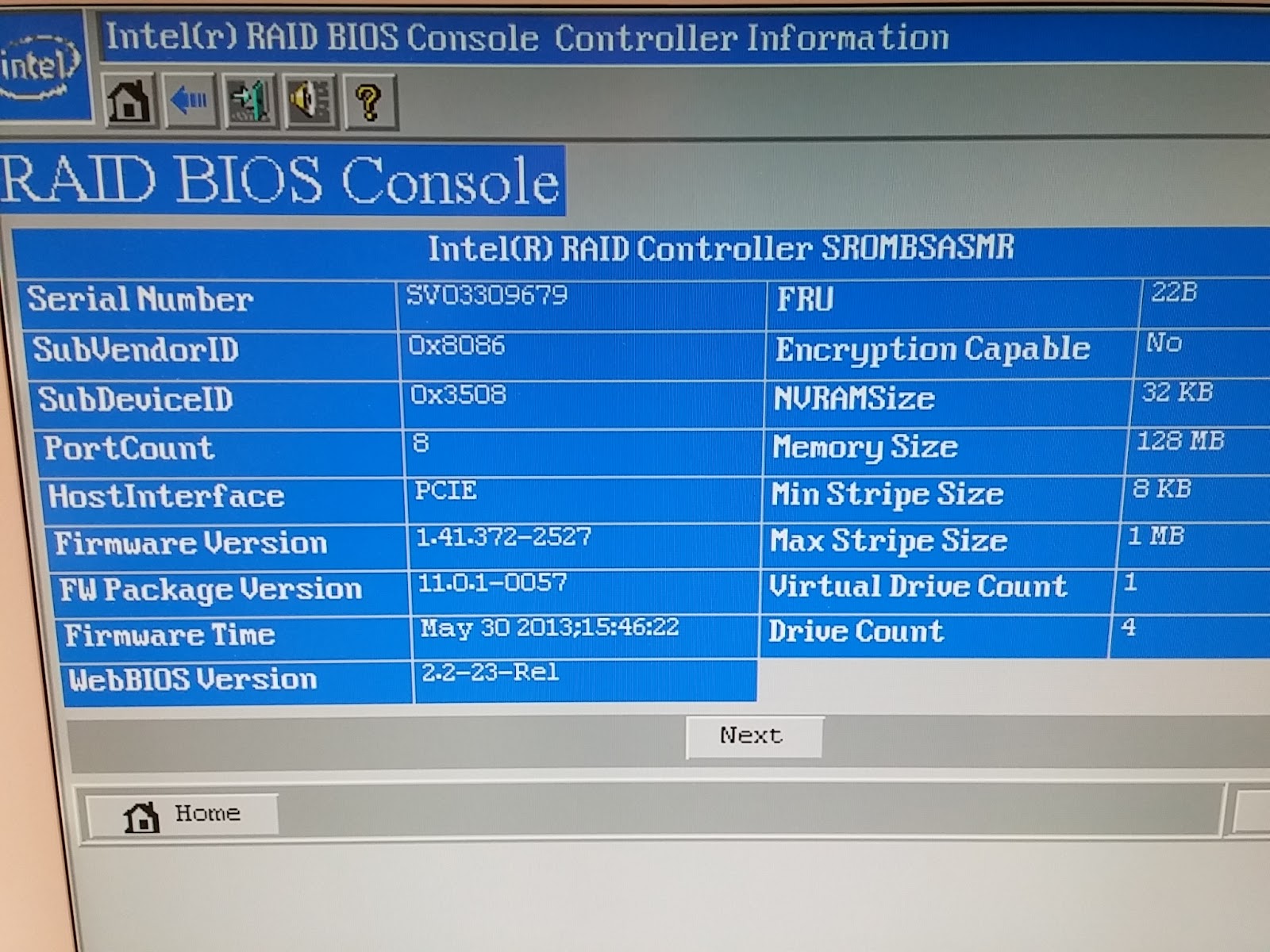
After the new drive was installed the RAID BIOS Console recognized it as an unconfigured drive.

To add the drive to the existing drive group and expand the array, use the Migration with addition option.

After you confirm you want to perform this operation, the reconstruction process starts. This took about 10 hours to complete.
When the reconstruction was complete, the new drive was successfully added to the RAID 5 array.
The server was rebooted and the next step was to enable XenServer to see the additional storage space. See part 2 for more information.
December 03, 2015
PA State Budget
As most Pennsylvania's know, the state budget is way overdue. It looks like the Republicans are going to give into the Governor and raise sales or income taxes without addressing property taxes.
Please contact your local representatives now and tell them we need property tax reform now!
Here is the letter I sent to my reps.
Please do not increase taxes (income or sales) for school districts WITHOUT capping or eliminating property taxes!
Don't cave to the Governor's tax and spend liberal demands. He is wrong and bad for Pennsylvania.
Thank you
Please contact your local representatives now and tell them we need property tax reform now!
Here is the letter I sent to my reps.
Please do not increase taxes (income or sales) for school districts WITHOUT capping or eliminating property taxes!
Don't cave to the Governor's tax and spend liberal demands. He is wrong and bad for Pennsylvania.
Thank you
November 06, 2015
Book Review
Islamic Imperialism: A History by Efraim Karsh
As the title suggests this is a book about the history of Islam and their basic tenet of ruling the world. The author writes about the major dynasties and events of Islamic rule from the beginning with Muhammad's claimed revelation from God to the current date (2007) of Osama bin Laden's Holy War.
The basic history of Islam is to rule the world and convert everyone to the Islamic faith. Throughout history there have been more aggressive leaders that would kill the infidel while other leaders would leave them alone as long as they paid their dues, taxes, tributes, protection money, or whatever you want to call it.
Since it is a history book, I found it rather boring and in fact I could only read a few pages a night before my eyes would magically close. However, I don't believe there is any reason to doubt any of the facts in the book. In fact, there are over 30 pages of footnotes to back up what the author writes.
One aspect of the book that I did not like is how the author jumped around historically. For example, in one chapter he starts writing about events that happened in 1993 with Bill Clinton, then a few paragraphs later jumps back to the Ottoman Empire in 1916. Then gets back to the 1990's a few pages later, only to jump back to the 1970's after that. Then ending the chapter back in the 1990's again. The chronological jumping around got me lost on several occasions. Not only that, but many of the Islamic people had very similar names, most of which I could not pronounce.
If you are interested in a brief history of the major parts of the Islamic Imperialist doctrine then I would recommend this book. If you are simply looking for something to help you sleep at night, then I also would recommend this book! Otherwise, take a pass on this one.
As the title suggests this is a book about the history of Islam and their basic tenet of ruling the world. The author writes about the major dynasties and events of Islamic rule from the beginning with Muhammad's claimed revelation from God to the current date (2007) of Osama bin Laden's Holy War.
The basic history of Islam is to rule the world and convert everyone to the Islamic faith. Throughout history there have been more aggressive leaders that would kill the infidel while other leaders would leave them alone as long as they paid their dues, taxes, tributes, protection money, or whatever you want to call it.
Since it is a history book, I found it rather boring and in fact I could only read a few pages a night before my eyes would magically close. However, I don't believe there is any reason to doubt any of the facts in the book. In fact, there are over 30 pages of footnotes to back up what the author writes.
One aspect of the book that I did not like is how the author jumped around historically. For example, in one chapter he starts writing about events that happened in 1993 with Bill Clinton, then a few paragraphs later jumps back to the Ottoman Empire in 1916. Then gets back to the 1990's a few pages later, only to jump back to the 1970's after that. Then ending the chapter back in the 1990's again. The chronological jumping around got me lost on several occasions. Not only that, but many of the Islamic people had very similar names, most of which I could not pronounce.
If you are interested in a brief history of the major parts of the Islamic Imperialist doctrine then I would recommend this book. If you are simply looking for something to help you sleep at night, then I also would recommend this book! Otherwise, take a pass on this one.
September 01, 2015
Book Review
Billy Graham: Personal Thought of a Public Man by David Frost
This book is a compilation of David Frost's various interviews with Billy Graham over a period of 33 years. The book is divided into 10 chapters, each dealing with a different topic. Some of the topics are family, marriage, politics, presidents, sin, moral/social issues, temptations and heaven.
Overall, I found this book very interesting. The name Billy Graham is very well known, however, I didn't know much about him before reading this book. In fact, I was even surprised to learn a few facts about his life. For example, at one point in his life he dogmatically preached on and described the actual dimensions of heaven. Another topic that surprised me was that he believes there is life on other planets in the universe.
I recommend this book if you are interested in learning more about the life and thoughts of Billy Graham.
This book is a compilation of David Frost's various interviews with Billy Graham over a period of 33 years. The book is divided into 10 chapters, each dealing with a different topic. Some of the topics are family, marriage, politics, presidents, sin, moral/social issues, temptations and heaven.
Overall, I found this book very interesting. The name Billy Graham is very well known, however, I didn't know much about him before reading this book. In fact, I was even surprised to learn a few facts about his life. For example, at one point in his life he dogmatically preached on and described the actual dimensions of heaven. Another topic that surprised me was that he believes there is life on other planets in the universe.
I recommend this book if you are interested in learning more about the life and thoughts of Billy Graham.
Subscribe to:
Posts (Atom)